
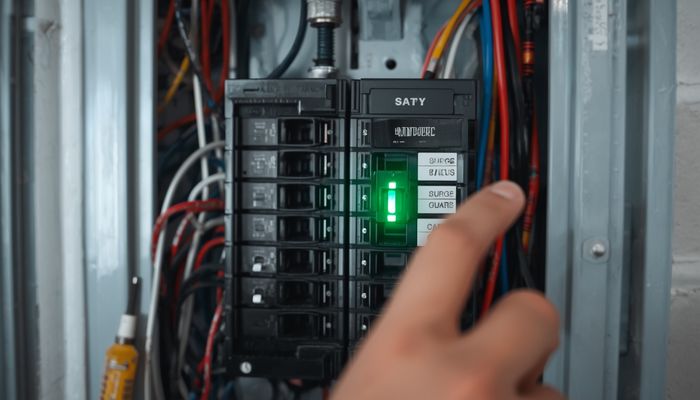
A whole house surge protector (Type 2 SPD) installs at your electrical panel and clamps voltage surges from lightning, grid switching, and large appliance shutoffs before they reach your outlets. Installed cost is $200-$700 with most homeowners paying $300-$450. They last 5-15 years and should be paired with point-of-use surge strips on sensitive electronics. Top brands: Eaton, Square D, Siemens, and Intermatic. Installation is a 30-minute electrician job; this is not a DIY project because it requires opening the live panel.
What a panel-mounted SPD actually protects
A whole house surge protector is a Type 2 surge protection device (SPD) installed in or next to your main electrical panel, wired into a dedicated double-pole breaker. It uses metal-oxide varistors (MOVs) that conduct rapidly when voltage exceeds a clamp threshold (typically 600-1500V), diverting the surge to ground before it reaches branch circuits. Modern units handle surge currents of 40-100 kA and have visual indicators showing protection status.
Device plus electrician, all in
A whole house surge protector costs $100-$400 for the device and $100-$300 for electrician installation, totaling $200-$700. Higher surge ratings (80-100 kA), notification features (LED, app), and warranties up to $50,000 in connected equipment coverage push prices toward the high end. Installation in a finished panel is 30-45 minutes; new panel installs include the SPD for $50-$150 added cost.
| Tier | Surge Rating | Connected Equipment Warranty | Total Installed |
|---|---|---|---|
| Basic | 40-50 kA | $10,000-$25,000 | $200-$350 |
| Mid-range | 60-80 kA | $25,000-$50,000 | $300-$500 |
| Premium | 80-100 kA | $50,000-$75,000 | $400-$700 |
| With monitoring/app | 60-80 kA | $25,000-$50,000 | $450-$750 |
How long an SPD lasts before it sacrifices itself
A whole house SPD lasts 5-15 years depending on how many surges it absorbs. The MOVs degrade slightly with each clamping event; a unit in a lightning-prone area may need replacement at 5-7 years, while one in a low-surge area easily lasts 10-15. Modern SPDs include status LEDs that turn off or flash red when protection is exhausted. Replace within a week of the indicator changing; an exhausted SPD provides zero protection.
Why this one belongs to a licensed electrician
Whole house surge protector installation is not a DIY project — it sits on the far side of the same line that separates swapping a light fixture from adding a circuit. It requires opening the live panel, working near the main bus bars (which remain energized even when the main breaker is off in many panel designs), wiring into a double-pole breaker, and proper grounding to the panel’s grounding electrode system. Permit requirements for an SPD vary by jurisdiction, so ask your building department; either way the work falls under electrical code and homeowner installation can void insurance.
Choosing a Type 2 device by joule rating
Eaton CHSPT2ULTRA and Square D SDSA1175 are the industry workhorses. Note that Schneider lists the SDSA1175 as UL 1449 Type 1 rather than Type 2 — that is the more permissive listing, so it can go on either side of the service disconnect and is fine in a Type 2 location, but check with your electrician which listing your panel and local code call for. Siemens FS140 is a strong value pick. For homes in lightning-prone areas (Florida, Gulf Coast, mountain West), step up to a higher-capacity device like the Intermatic IG2240-IMSK. Match the SPD brand to your panel brand for warranty integration and simplest install. Surge ratings below are each manufacturer’s stated maximum surge current per phase, except where noted; Intermatic does not publish a comparable per-phase figure for this model, so that cell is left blank rather than guessed.
| Brand | Notable Model | Surge Rating | Warranty |
|---|---|---|---|
| Eaton | CHSPT2ULTRA | 108 kA | $75,000 |
| Square D | SDSA1175 | 36 kA per phase | — |
| Siemens | FS140 | 140 kA | $25,000 |
| Intermatic | IG2240-IMSK | — | $50,000 |
| Leviton | 51120-1 | 50 kA per phase | $25,000 |
How to tell yours has already failed
Replace your SPD when the status LED has turned off or flashes red (protection exhausted), it has been in service over 10 years regardless of indicator, you have had a direct or near-direct lightning strike (visible burn marks or breaker trip), or you are upgrading your panel and the existing SPD is over 5 years old. SPDs are inexpensive enough that proactive replacement at the 10-year mark is good practice.
Do I still need surge strips if I have whole house surge protection?
Yes. Whole house SPDs clamp the biggest surges before they reach your circuits, but a residual surge of 200-600V can still reach outlets. Point-of-use surge strips at TVs, computers, and home theater gear provide the second layer of protection, and anything on a low-voltage outdoor transformer is worth putting behind protection too, since outdoor runs take grid surges first. Together, the two layers cover the surge events a house actually sees.
Will a whole house surge protector stop lightning damage?
It can stop or significantly reduce damage from nearby lightning strikes that travel through the power lines, but a direct strike to the home or service mast can exceed any consumer SPD’s clamping capacity. For direct-strike protection, you need a structural lightning protection system (air terminals, down conductors, ground rods) installed per NFPA 780.
Can I install a Type 1 SPD outside the panel?
Yes; Type 1 SPDs install on the line side of the main breaker (between the meter and the panel) and clamp even larger surges. They cost $300-$700 installed and require utility coordination because the line side is always energized. Most homeowners are well-served by a Type 2 SPD at the panel.
Why did my SPD fail after one summer?
Either you took a major direct or near-direct lightning hit, or you have a poor grounding system that forced the SPD to clamp small daily surges constantly. Have an electrician test your home’s grounding resistance (target: under 25 ohms, ideally under 5 ohms) and add ground rods if needed. A good ground extends SPD life dramatically.

