
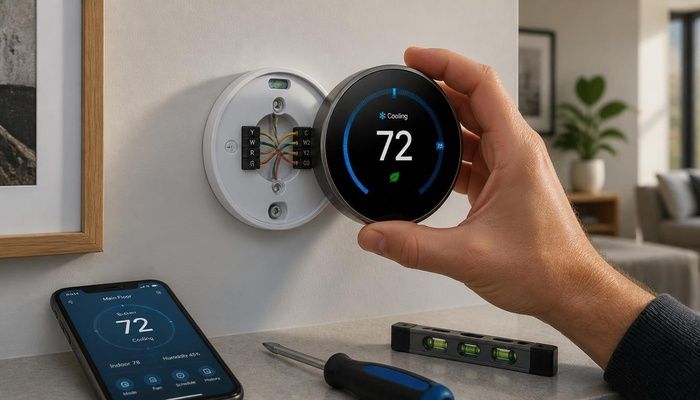
It was a Tuesday. I came home from work, tossed my keys on the counter, and noticed the house was 84 degrees. In November. The ancient Honeywell thermostat on the wall — the round beige one with the mercury bulb that had been there since 1994 — was blank. Dead screen. No response to tapping, poking, or the more aggressive percussive maintenance I attempted. The furnace was off, the house was roasting from the afternoon sun, and I had no way to control either one.
That dead thermostat turned out to be one of the best things that ever happened to my utility bills. But I did not know that yet. At that moment, I was just a guy on his phone, Googling “round thermostat no display fix” and getting nowhere. The next morning, I was at Home Depot staring at a wall of smart thermostats priced from $99 to $279, trying to figure out if I needed the fancy one or the basic one.
I grabbed the Nest Thermostat for $129 — the entry-level model. Not the Learning one that costs twice as much, just the white puck with the mirrored front. It came with a trim kit to cover the gap if the old thermostat left a bigger footprint, which was thoughtful because my old Honeywell was huge. The box contained the thermostat, the base plate, screws, wire labels, and a little screwdriver. No C-wire adapter included — that turned out to be important later.
Back home, I killed the breaker for the furnace. I cannot stress this enough: do not skip this step. I once saw my dad get zapped changing a light fixture because he only flipped the wall switch, not the breaker. The wall switch was on the neutral, not the hot. I think about that every time I touch a wire. I tested with my voltage pen — no power — and pulled the old thermostat off the wall.
My wiring was a mess. Wires everywhere. R, W, Y, G, plus a brown one and a black one I did not recognize. No blue wire anywhere — no C-wire. My heart sank a little because I remembered reading that most smart thermostats need a C-wire. The Nest app had a compatibility checker that told me my system would work without one, but warned that some systems might cycle the furnace on and off to steal power, which can cause problems with older equipment. I decided to push forward and see what happened.
I took a photo, labeled the wires I understood (R, W, Y, G), and disconnected the old base. The two mystery wires — brown and black — I left disconnected and taped off. A quick Google suggested they were probably for an old humidifier that had been removed years ago. The Nest base only needed the four labeled wires plus a common if I had one. I did not, so I left the C terminal empty.
Mounting the Nest base was easier than I expected. It has a built-in level — a little bubble in the plastic — which is genius and saved me from my usual crooked-installation routine. Two screws into the existing drywall anchors and it was solid. I fed the four wires into their matching terminals: R to R, W to W1, Y to Y1, G to G. Each terminal has a button you press down, push the wire in, and release. No screwdriver needed. It felt almost too easy.
I snapped the Nest onto the base, flipped the breaker back on, and the display came alive with a spinning circle. After about a minute, it asked me to connect to Wi-Fi. I entered my password on the thermostat’s touch ring — which is a clever little rotating dial — and then switched to the Google Home app on my phone for the rest of the setup. The app asked whether I had forced air, a heat pump, or a boiler. Forced air with central AC. Then it tested the system: heat came on, cool came on, fan spun up. Everything worked.
Then I hit my snag. Two days later, my furnace started short-cycling — turning on for 30 seconds, off for a minute, on again. The Nest was trying to steal power from the furnace circuit to charge its internal battery, and my 20-year-old furnace control board did not like it. I called my HVAC guy. For $85, he ran a C-wire from the furnace control board up to the thermostat. Took him 30 minutes. After that, the Nest ran perfectly. If you have an older furnace like mine, plan for this possibility. Or just buy the model that includes the C-wire adapter kit.
Once the C-wire was in, the Nest started learning. Every time I adjusted the temperature, it logged the time and temperature. After a week, it suggested a schedule. After two weeks, it started automatically setting back the temperature when it sensed nobody was home. The Nest has a motion sensor and uses your phone’s location. If both say you are away, it goes into Eco mode and saves energy.
My first full month with the Nest, my gas bill dropped from $187 to $148 — on top of what insulating the attic had already taken off the bill. The second month: $139. I was saving about $40 to $50 a month during heating season. Over a full year, I figure the Nest saves me around $200 to $250 in combined heating and cooling costs. That means the $129 thermostat plus the $85 C-wire install paid for itself in less than a year. Everything after that is pure savings.
The feature I did not expect to love: the monthly energy report. Every month, Google sends me an email comparing my usage to other Nest users in my area. Last January, it told me I used 18 percent less energy than similar homes and earned a “leaf” icon. Is it silly to be proud of a leaf icon in an email? Maybe. But it gamifies saving energy in a way that actually works. I find myself checking the app to see if I can earn another leaf.
There is one thing I wish I had known before starting: not all smart thermostats work with all systems. Heat pumps need a thermostat that can handle the O/B reversing valve terminal. Multi-stage systems need a thermostat with W2 and Y2 terminals. Boilers and radiant floor heat have their own quirks. Check the manufacturer’s compatibility tool before you buy. Nest has one on their website where you answer a few questions and it tells you which models will work. I did this in the store on my phone and it saved me from buying the wrong thing.
If I had to do it all over again, I would buy the Ecobee instead of the Nest — not because the Nest is bad, but because the Ecobee comes with a room sensor and the C-wire adapter in the box. For $219, I would have gotten everything I needed without the extra $85 service call. But I did not know I lacked a C-wire until I had already opened the wall. Live and learn.
The bottom line: if you have a dead thermostat, a drafty house, or just utility bills that make you wince, replacing your thermostat with a smart one is the easiest energy upgrade you can make. It is not the biggest one — that is still whatever is or is not sealing your envelope — but it is the easiest. It takes less than an hour, costs less than a weekend grocery run, and the savings start showing up on your very next bill. Just check for a C-wire first.


